The Science of Side-by-Side Studying: Why Visual Problem Solving Beats Tab Switching
The Science of Side-by-Side Studying: Why Visual Problem Solving Beats Tab Switching
When solving STEM problem sets, human working memory operates under tight physiological constraints. According to cognitive load theory formulated by educational psychologist John Sweller, working memory can only hold a few pieces of novel information simultaneously.
Yet the typical student workflow forces a destructive cognitive bottleneck:
- Open a photo of a homework problem on a smartphone or separate browser tab.
- Memorize three variables and an equation.
- Switch tabs to a Google Doc, Notion page, or scratchpad.
- Attempt to write down the solution step.
- Forget the negative sign or subscript.
- Switch back to the image tab to verify.
This process is known as split-attention effect and context switching fatigue.
Why Tab Switching Destroys Academic Focus
Every time your brain switches between visual tabs or screens, your prefrontal cortex experiences an attentional reset penalty.
Research published by the American Psychological Association (APA) demonstrates that brief mental blocks created by shifting between tasks can cost as much as 40 percent of productive study time.
The Three Costs of Disconnected Study Layouts
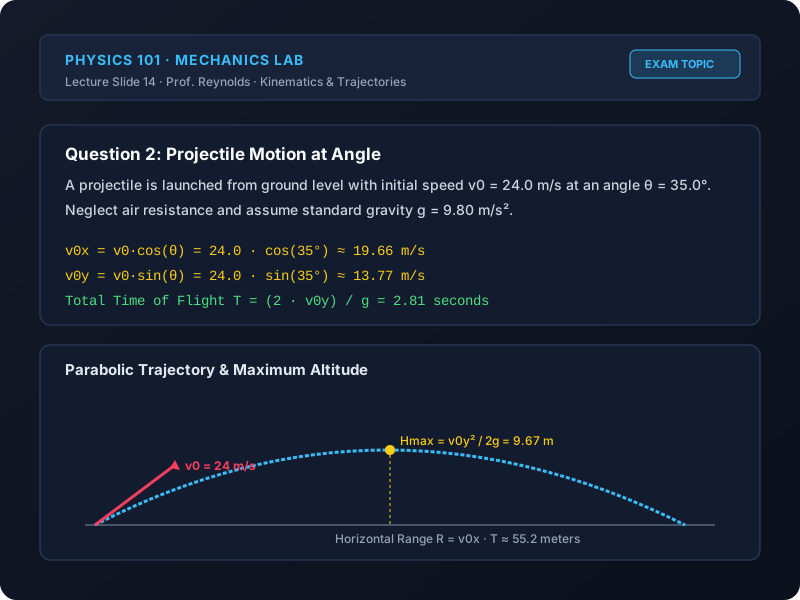
- Loss of Spatial Anchors: In geometry, physics kinematics, and biochemistry, understanding a problem requires referencing a visual diagram while writing down equilibrium equations. If the diagram disappears when you type, mental models break down.
- Transcribing Errors: Copying numbers from a separate screen leads to transcription mistakes (e.g., writing
v0 = 24.0 m/sasv0 = 20.4 m/s). - Friction and Procrastination: When solving a multi-step calculus derivation feels ergonomically painful, students lose momentum and reach for their phones.
The Solution: A Dedicated 50/50 Side-by-Side Workspace
Album Sorter’s Side-by-Side Study Mode was engineered specifically to eliminate the split-attention effect:
┌───────────────────────────────────────┬───────────────────────────────────────┐
│        LEFT PANE (50% WIDTH)          │        RIGHT PANE (50% WIDTH)         │
│                                       │                                       │
│   [High-Resolution Problem Image]     │   [Integrated Markdown & Math Pad]    │
│   • Pan & Zoom (Up to 250%)           │   • Automatic LocalStorage Save       │
│   • Diagram Inspection                │   • Equation Templates                │
│   • 1-Click OCR Text Extraction       │   • Step-by-Step Checklist            │
│                                       │                                       │
└───────────────────────────────────────┴───────────────────────────────────────┘
1. Zero Spatial Context Switching
With the diagram locked on the left half of your screen and your notepad on the right, your eyes only travel a few centimeters. Working memory is freed up for actual reasoning rather than remembering numbers.
2. One-Click OCR Statement Extraction
Retyping problem statements is a waste of study time. With Album Sorter, clicking “📋 Paste into Right Notepad” extracts the problem text directly from the image into your working notes, ready for annotation.
3. Distraction-Free Single-Tab Architecture
Because the workspace operates as a unified web canvas, you don’t need third-party window resizers or separate document windows that clutter your desktop.
Practical Checklist for Maximum Homework Retention
When tackling complex assignments, follow this protocol:
- Step 1: Open your assignment deck in Album Sorter.
- Step 2: Enter Side-by-Side Mode and adjust zoom until mathematical indices are clearly legible.
- Step 3: Click “Insert Steps” to generate an organized solution scaffold (
Identify Variables,Governing Formula,Execution). - Step 4: When finished, click “Export Note” to save your clean solution for submission.
Conclusion
Studying efficiently is not just about studying harder; it is about designing an environment that respects human cognitive architecture. By bringing problem screenshots and answer notepads together onto one unified canvas, Side-by-Side Study Mode helps students solve problems faster with fewer errors.
Ready to stop losing homework screenshots?
Try Album Sorter right now in your browser. No account required—search inside your images and study in Side-by-Side mode.